Free Printable Electrical Panel Directory Template
By Wiring Atlas
The best time to label a panel is on a calm Saturday afternoon. The worst time is at night, with a flashlight in your teeth, flipping breakers one by one while the freezer warms up.
The Electrical Safety Foundation puts it plainly: label your panel so you can quickly turn off and restore power when you need to. This free sheet makes that a one-afternoon job, and you can type into it or print it blank.
Download the Sheet, Then Fill It In Four Steps
- PDF Panel directory, 30 spaces Fillable PDF. Type in your browser or print it blank.
- PDF Panel directory, 42 spaces Same sheet with smaller rows for bigger panels.
- XLSX Excel workbook, both sizes Opens in Excel or Google Sheets. One tab per size.
- Pick your size. Count the spaces in your panel, then grab the 30 or 42 space sheet. Check that your panel numbers odd spaces down the left and even spaces down the right, like the sheet does.
- Map each breaker. Turn them off one at a time and note what loses power, as shown in the steps below.
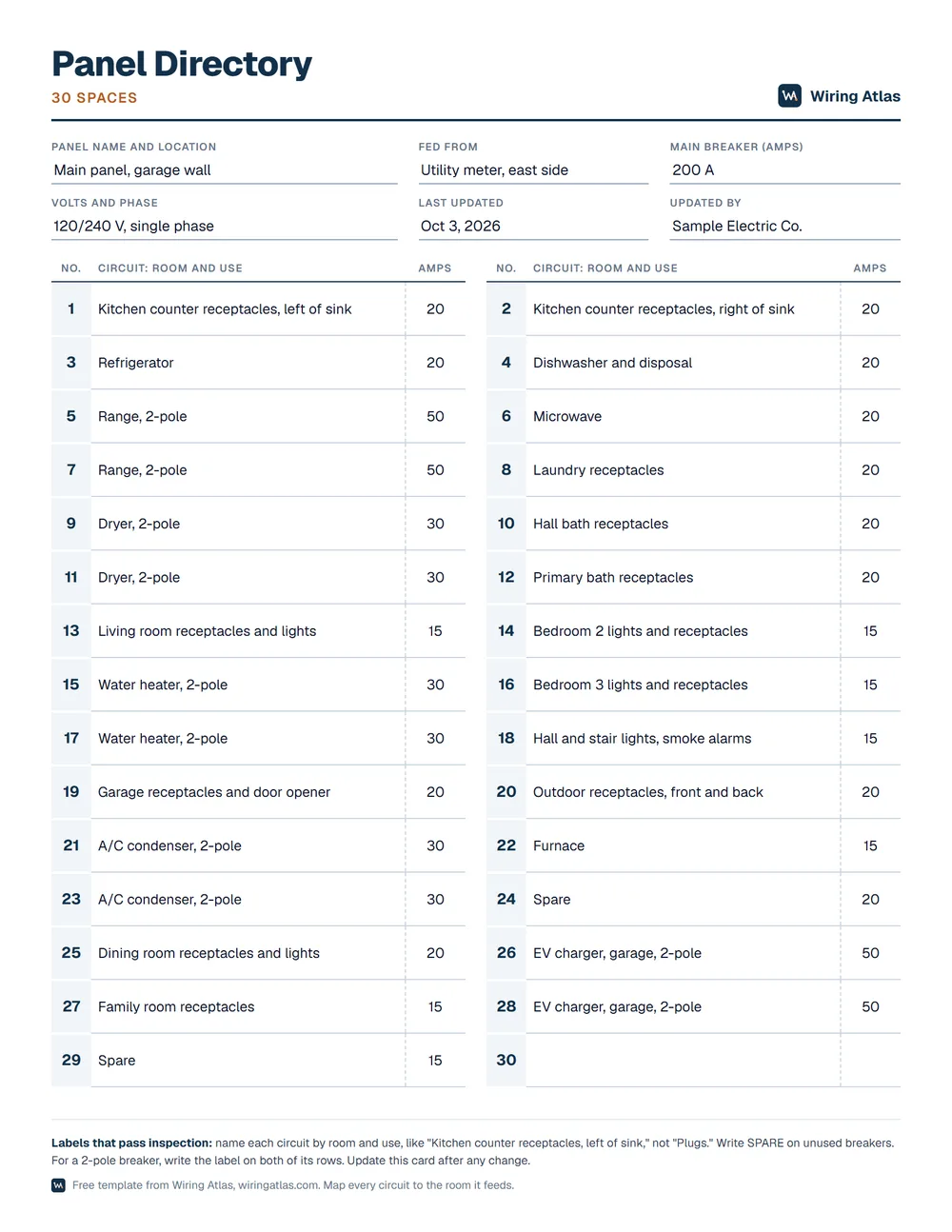
- Write a specific label and the amps. Name the room and the use, not just “plugs.” These examples show the difference.
- Print it and post it. It goes on or inside the panel door, and a few placement tips keep it readable for years.
Map Every Breaker With the Cover On
You never need to take the panel cover off for this. Every step happens with the door open and the cover in place.
- Gather a helper and a few testers. A lamp, a radio, or a plug-in outlet tester shows when an outlet goes dead. A helper with a phone saves you dozens of trips.
- Switch off one breaker. Walk the whole house and write down every light, outlet, and appliance that lost power. Check the garage, the attic, the outside outlets, and the smoke alarms too.
- Switch it back on before the next one. Work in order, 1, 2, 3, so nothing gets skipped.
- Watch for 2-pole breakers. These wide breakers take up two spaces and usually run big loads like a range, dryer, water heater, or A/C.
If a breaker trips again soon after you reset it, stop there. ESFI says frequent trips point to a problem that a qualified electrician should inspect.
Write Labels an Inspector Will Accept
The National Electrical Code asks for each circuit to be labeled by its clear, evident, and specific purpose. The same rule says unused breakers get marked as spares, and a label can’t depend on who lives in the room.
Short on room? Common shorthand like KIT or MBR is fine. Here’s what the usual panel abbreviations mean.
| Vague label | Clear label |
|---|---|
| Plugs | Kitchen counter receptacles, left of sink |
| Kitchen | Dishwasher and disposal |
| Lights | Hall and stair lights, smoke alarms |
| Bobby’s room | Bedroom 2 lights and receptacles |
| Left blank | Spare |
For a 2-pole breaker, write the label on both of its rows. That way nobody mistakes the second space for an empty one.
Where the Finished Directory Goes
The code lets the directory sit on the face of the panel, inside the door, or in an approved spot right next to it. Inside the door is the easiest place to keep it clean and dry.
- Protect it. Slip it into a clear sheet protector or the door’s card holder before you tape it up.
- Date it. Fill in “Last updated” so the next person knows how fresh it is.
- Snap a photo. Keep a copy on your phone for the day the paper goes missing.
- Update it after any change. A new circuit or a moved breaker makes the old card wrong on day one.
For Electricians: Hand Over More Than a Card
When you label a panel for a customer, the paper card is usually the only record left behind. Two years later it’s faded, missing, or wrong, and you’re back to flipping breakers.
Wiring Atlas keeps the directory with the building. Each breaker links to the rooms, outlets, lights, and EV chargers it feeds on a floor plan you draw once, and you can print a typed record with the customer, the address, every panel’s breaker schedule, and each device grouped by room. On new work, that plan starts at the first walkthrough with the customer, before any wire goes in.
Weighing other apps first? Here’s how seven panel schedule tools stack up on price and features.