Best Electrical Panel Schedule Software for Electricians
By Wiring Atlas
Open a panel on almost any service call and you know the drill. The directory says “Lights,” “Plugs,” and one faded ”?” in pencil. Then the breaker hunt starts, with someone yelling “still on!” from the kitchen.
That card is more than a nuisance. The National Electrical Code asks for every circuit to be labeled by its clear, evident, and specific purpose. In workplaces, OSHA requires each breaker to be legibly marked unless its purpose is obvious.
The right app fixes that card once and keeps it current after every change. We sorted the options around one question: which tools fit an electrician working in buildings that already exist?
Seven Panel Tools Side by Side
| Tool | Best for | Works on | Free option | Paid price |
|---|---|---|---|---|
| Wiring Atlas | Circuits tied to a building map and your jobs | Web browser, sized for tablets | Yes, up to 3 buildings | $39 a month |
| Kopperfield | Load calcs and permit paperwork | Web, iPhone, Android | Free panel tool | From $34.99 a month, billed yearly |
| Panel Manager | Quick schedules your crew can share | iPhone and iPad | Free app | None listed |
| Breaker Box | A printed directory sized for the panel door | iPhone, iPad, Mac, Android | Free app | $9.99 once for Pro |
| PanelLedger | Facilities with QR codes and lockout records | Phone, tablet, or computer | Up to 3 panels | From $99 a month |
| CircuitSchedule | One fast printout with no account | Web browser | Free, no sign-up | None listed |
| Best Bid Panel Scheduler | Commercial voltages at a one-time price | Installed on your computer | None | $19.95 once |
Here’s how we’d pick, based on the work you do:
- Service and remodel work in buildings you’ll see again: Wiring Atlas.
- An iPhone crew that wants something free today: Panel Manager.
- A cheap, clean directory for the panel door: Breaker Box, or CircuitSchedule for a one-off.
- Permits and load calculations: Kopperfield.
- Plants and facilities with lockout rules: PanelLedger.
Designing a New Building? Use a Design Tool
Engineers laying out a new building should pull schedules straight from the design model. Revit builds them from the connected circuits, and ETAP ties them to load flow, short circuit, and arc flash studies.
Everything below is for the other job: recording panels that already exist and keeping them right.
Wiring Atlas
Full disclosure: we make this one, so weigh our take with that in mind. Here’s what it does and where it falls short.
Most tools treat a panel like a list. Wiring Atlas treats it as part of a map of the whole building, with each room, outlet, light, and EV charger drawn where it really is. Pick a circuit, and every device it feeds lights up on the floor plan.
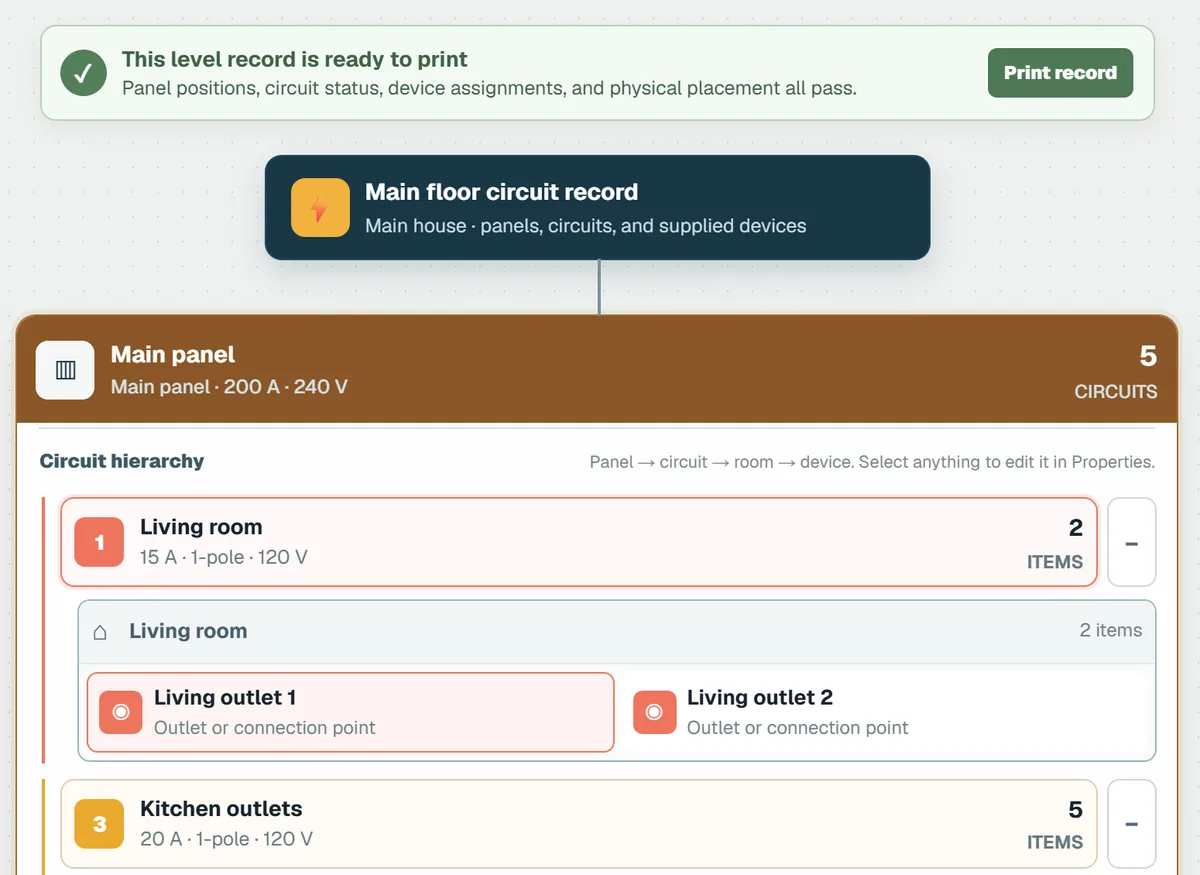
Each circuit keeps its breaker position, amp rating, pole count, voltage, and status, including spare and unused slots. Numbering follows the US layout, odd on the left and even on the right, and only a tandem pair can share a slot. Once every device is assigned, you can print a checked circuit record for each level.
The same map feeds the rest of the job, from the on-site walkthrough to customer approval reports and crew job sheets, plus a history that stays with the building. Pro is $39 a month for up to 3 people, and Team is $79 a month for up to 15 (full pricing).
Where it falls short: it doesn’t do NEC load calculations, and it runs in a web browser instead of a phone app.
Kopperfield
Kopperfield is built around design and permit paperwork. Its panel tool runs load calculations, can read breaker values from a photo of the panel, and prints a PDF with a circuit directory and labels.
The panel tool is free to try on the web, with apps for iPhone and Android. Paid plans start at $34.99 a month billed yearly, and commercial panel schedules need Commercial Pro at $79.99 a month billed yearly.
Pick it if you pull permits often and want load calcs and one-line diagrams in the same place.
Panel Manager
Panel Manager is a free iPhone and iPad app for building schedules on site. Each entry holds the circuit number, description, and breaker size, and the app runs load calculations as you go.
Sharing is the standout. Your crew joins with a 6-character code, and changes sync to every device right away. The catch is that it’s only listed for iPhone and iPad, so a mixed-phone crew can’t all use it.
Breaker Box
Breaker Box links each breaker to the rooms and fixtures it controls. It handles tandem and multi-pole breakers, GFCI outlets, and 1, 2, and 3-phase panels.
Its best trick is the printout: a PDF sized to slip into the panel sleeve or tape to the door. The app is free, a lifetime Pro license with cloud sync costs $9.99, and there’s an Android version too.
PanelLedger
PanelLedger is built for commercial sites and facility teams. A QR code on each panel opens the latest schedule, and lockout/tagout requests go out for approval by email.
Every change lands in a log that can’t be quietly edited, and the app flags panel doors whose paper copy needs reprinting. It’s free for up to 3 panels, then starts at $99 a month for up to 15.
CircuitSchedule
CircuitSchedule is the fastest way to get one clean directory on paper. There’s no sign-up: fill in the circuits, print the PDF, and use the QR code on it to reopen and edit later.
With no account, there’s no list of customers or buildings to come back to. It’s great for a single panel and thin for running a business.
Best Bid Panel Scheduler
Best Bid’s Panel Scheduler is a one-time purchase from an electrical estimating company. It covers 120/208 and 120/240 panels in single and three-phase, 480/277 three-phase, and MDP panels, up to 4 sections.
It makes the schedule sheet and little else. That suits a shop that just needs clean commercial schedules without another subscription.
What to Check Before You Choose
- Spares and lasting names. The same NEC rule says spare breakers must be marked as spares, and a circuit can’t be named after whoever uses the room, like “Bill’s office.” Look for a spare status and room-based labels. If your crew uses shorthand, stick to abbreviations anyone can decode.
- A printout that fits. The code lets the directory sit on, inside, or next to the panel door, so check the PDF size against the panels you see most. Need one today? Grab our free printable panel directory.
- The phones your crew carries. Some of these tools only run on Apple devices, so confirm before everyone signs up.
- Memory between visits. When you’re back in two years, the schedule should be saved under that customer and building, not lost in someone’s camera roll.
- Easy updates. A schedule goes stale the day someone adds a circuit. The best tool makes a quick edit and a fresh printout painless.