Electrical Panel Mapping Software for Electricians
You flip breaker 14 and wait for a shout from the kitchen. Ten minutes later, you know what it feeds. Then the job ends, and that answer lives on a strip of tape.
Wiring Atlas keeps the answer for good. Every breaker links to the devices it feeds, and every device sits on a plan of the building right where it is.
No card needed, and a practice job on a demo garage lets you try every step first. See pricing
How it works
-
Step 1: Place the panel
Drag it to the wall where it hangs. Note if it's a main panel or a subpanel, with its amps, voltage, and phase.
-
Step 2: Add the circuits
Give each one its slot, breaker size, poles, and voltage. Odd slots go left and even slots go right, just like a US panel.
-
Step 3: Drop in the devices
Put each outlet, light, switch, fan, and EV charger in its room. Not sure of the circuit yet? The item waits in a tray.
-
Step 4: Link them up
Select a few items and assign them in one go, or drag them right onto a circuit.
Find a breaker without flipping one
Pick an outlet on the plan, and you see its panel and breaker. Pick a circuit, and everything it feeds lights up, room by room.
Choosing a panel shows every device it supplies. You can also open any wall from the side to check how high each switch and outlet sits.
Print a record you can stand behind
Before you print, Wiring Atlas checks the whole level. It confirms panel positions, circuit status, device links, and where each item sits.
The printed record groups every circuit by panel and room, and it joins the building's as-built history. That matters on job sites, where OSHA requires each circuit to be legibly marked at its breaker unless its purpose is obvious.
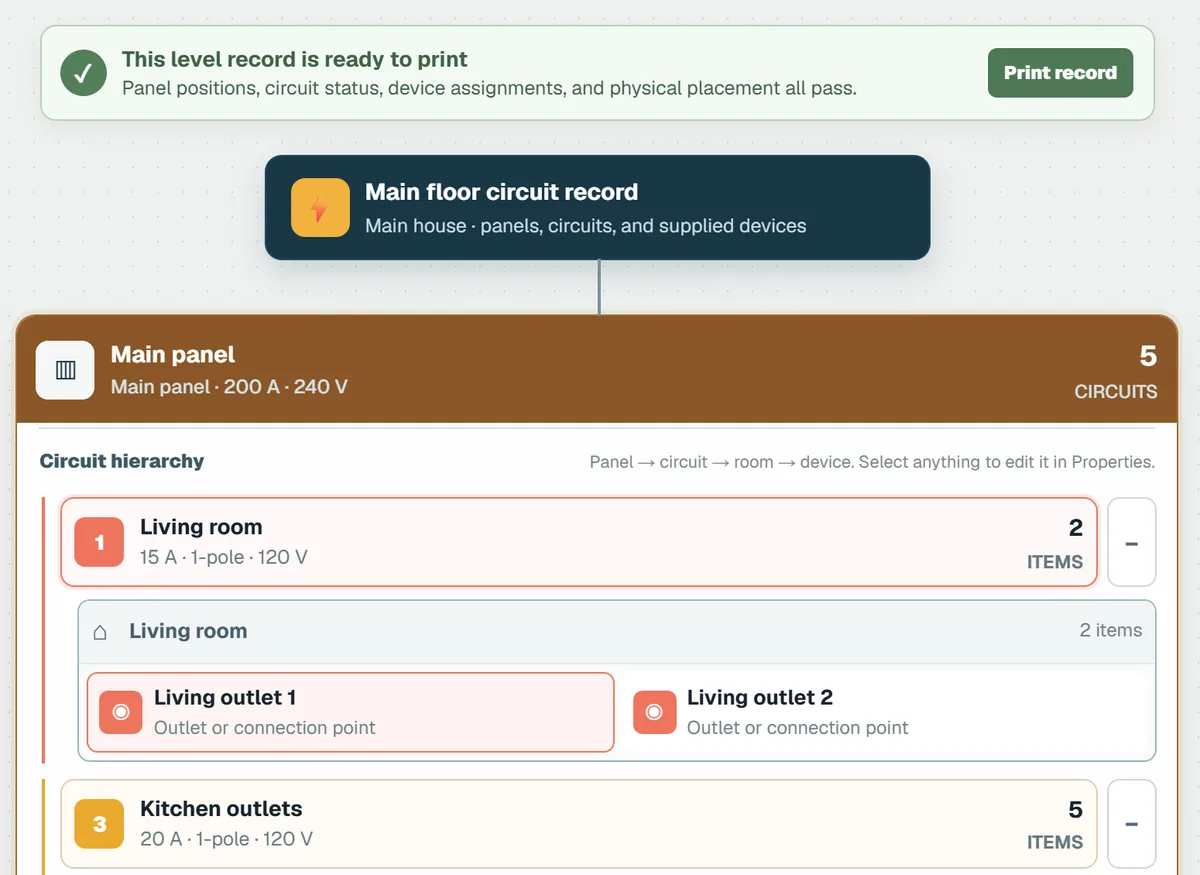
Spare and unused slots stay on the list, and nothing can be assigned to them by mistake.
Need one panel on paper today? Our free printable panel directory handles that, and the guide to breaker label abbreviations decodes old handwriting.
How it stacks up
| Paper directory | Single-panel phone apps | Wiring Atlas | |
|---|---|---|---|
| Where each device is | Written labels | Usually room names | Drawn on a measured plan |
| More than one panel | A card per panel | Varies by app | Main panels and subpanels together |
| Saved with the customer | No | Not usually | Yes, under their property |
| Shared with your crew | Only on site | Some apps sync | Yes, with edit or view-only access |
Looking at specific apps? Our roundup of panel schedule tools covers seven of them, including where each one beats us.
What it won't do
- It won't find circuits for you. You still trace them with a tracer or a helper, and Wiring Atlas records what you find.
- It doesn't run load calculations.
- It runs in a web browser sized for an upright tablet. There's no separate phone app.
One map, the whole job
- Electrical floor plans Rooms, levels, and devices drawn to their real size.
- As-built records What you planned, what changed, and what got installed.
- Change orders Each extra outlet priced, approved, and on file.
Trace each panel once and keep what you learn
The Free plan covers one person and up to 3 buildings. Pro is $39 a month for up to 3 people, unlimited buildings, and your logo on reports.
The first 50 companies on Pro pay half price for as long as they stay subscribed.